
Click covers for info. Copyright (C) Rudy Rucker 2021.


Archive for the ‘Rudy’s Blog’ Category

“At the Core of the World” Near End of JIM AND THE FLIMS

Friday, February 19th, 2010

Feb 16, 2010.

I got the first thousand words or so written on my chapter “The Goddess” today, the second-to-last chapter of my novel, Jim and the Flims.

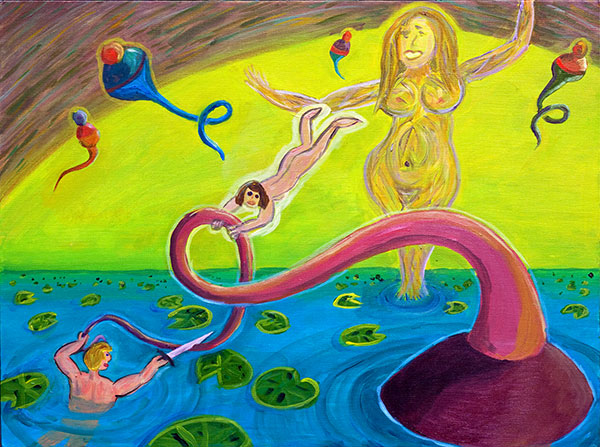
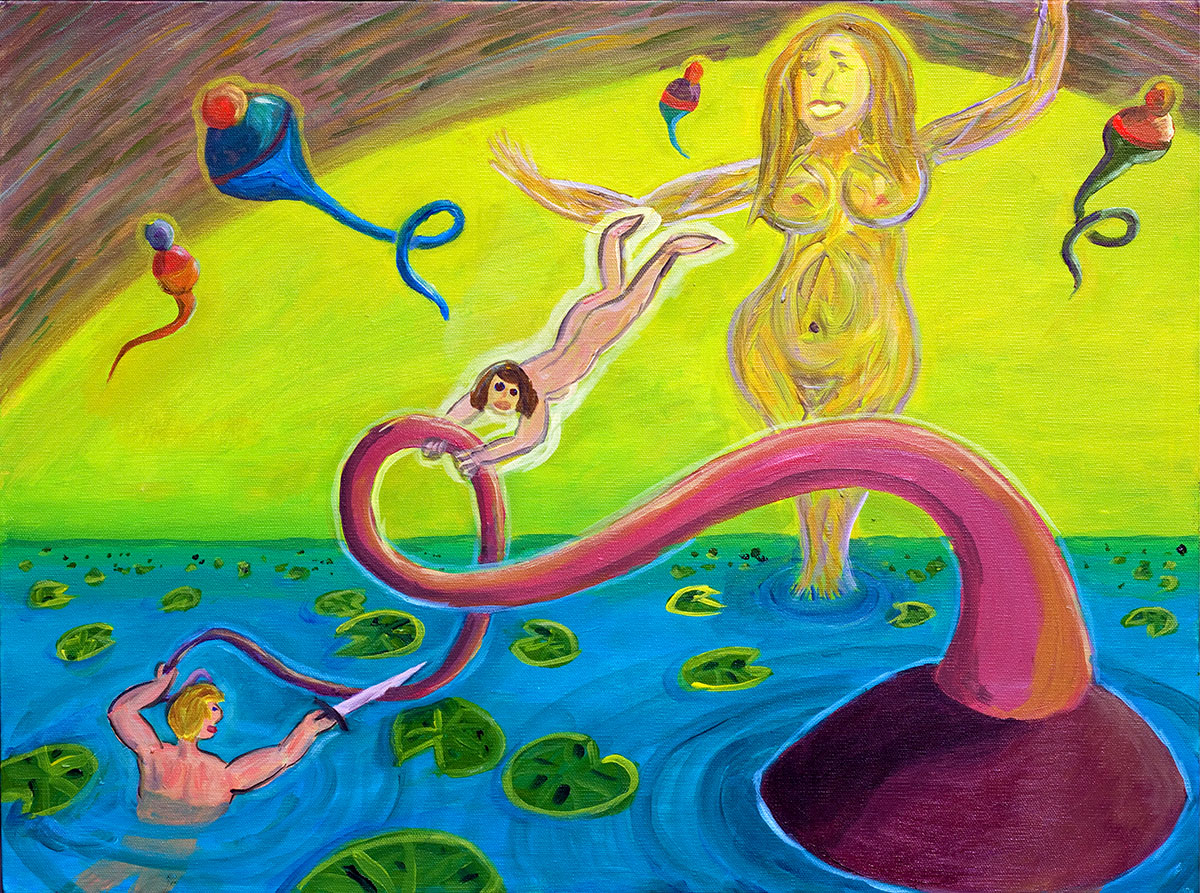
The last couple of weeks, I’ve been working on a painting of the scene in this chapter, showing Jim and Val in the sea at Flimsy’s core. I thought I finished the painting yesterday morning, but today in the afternoon, I revised it a little bit more after writing.

“At the Core of the World”. Acrylic, 24” x 18”. February, 2010. Click here for larger image.

I wasn’t sure what to call the painting. I considered calling it Unknown Legend, because it’s so clearly an illustration depicting some specific chain of events—but nobody (not even me, at least not fully) knows what the events are.

That must be Val who’s helping Jim cut off a piece of that big jiva’s tendril. I figure Jim has his young friend Durkle’s sword.

(I might mention here that (a) I derive my images of the jivas from the cartoonist and artist Jim Woodring’s work and that (b) it’s really only a coincidence that the main character in my novel is called Jim—the book was well underway before I met Woodring or started using jivas.)

Initially I’d imagined that my Jim would be fighting his way past the jiva, but maybe we’ve seen enough jiva-fighting by now. This picture suggests that the jiva is dead or maybe just acquiescent—given that she’s somewhat passively allowing Jim and Val handle her tail.

That’s the goddess of Flimsy in the background. Maybe the goddess killed the jiva and told Jim and Val to cut off a piece of it for her to eat? Or maybe they’re supposed to get something special from inside the jiva? A huge gem for the goddess.

I like the concept of a huge gem, that has a good fairy-tale quality, finding a treasure inside the body of the slain monster. But maybe I don’t want to bring the gem thing in. I don’t absolutely have to make my story match the picture that I happened to paint. But I do, at least in principle, like the notion of letting my subconscious painterly process provide some input into the plot.

I don’t want to overly slow things up. At this point the author, the narrator and the readers are on the luge of dramatic exigency, racketing down the slope, longing for the climax.

Feb 17, 2010.

I’m still wondering what Jim’s going to do with that piece of jiva tail he’s slicing off.

Here’s a different slant on that gem-in-jiva idea that I wrote about yesterday.

Souls are more valuable then gems. In Jim and the Flims, souls take the forms of sparkling little “sprinkles.” So it’s better if Jim is getting sprinkles from the jiva, and planning to give them to the goddess.

When I was talking to the cartoonist and artist Jim Woodring at the Clarion West party in Seattle this summer, I casually said something like, “It’s no big deal to have a soul, anything can have a soul, it’s just existence, or maybe a little bit of computational capacity.” I was on my hylozoic kick. And Woodring draws himself up, acting flabbergasted. “A soul—a soul is by no means easily made.”

Suppose that I go with Woodring’s view of things. So the sprinkles/souls are rare and precious. And the goddess of Flimsy is more or less continually sending sprinkles down to the septillion inhabited worlds of our universe so that new beings can keep being born. So it make sense that she’d be recycling sprinkles.

But we might also suppose that Flimsy is, with some difficulty, producing new sprinkles as well. Perhaps they’re growing in the flowers of the water lilies of the Paradise Sea.

And, now, getting back to my painting, At the Core of the World, what if that jiva Jim is carving on is the Memsahib High Jiva, the fattest of them all, the Empress of all jivas who hooks into all the bobbling bulbs down in the Dark Gulf. And suppose also that this Core Jiva accumulates all the souls that her subordinates catch. And there’s a huge stash of sprinkles tucked into her body, maybe into the tip of her tail, and Jim’s carrying it up to the goddess of Flimsy.

Feb 18, 2010.

I had a good day. I wrote about 1,600 words and now the first draft of the “The Goddess” chapter is done. It helped to have the painting to think about. I’ll revise the chapter once or twice and move into the final chapter soon.

It’s hard to stay at it, but, on the other hand, I don’t want to stop. At this point it’s almost like an athletic thing, like finishing a hike. I’m driving myself, but in a fairly pleasant way.

I’m thinking now about my next revision—which I hope to do tomorrow or this weekend or Monday. I have to put in the sprinkles drifting out of the water-lily blossoms.

And I’m thinking it’s better if the jiva tail-tip is like the cap on a plastic squeeze bottle of mustard, and that the whole jiva is full of sprinkles. So instead of the sprinkles (= souls) being in the tip of the tail they’re in the main body fo the jiva. And the goddess sticks that main tendril of the jiva into herself, like she’s filling up a car with gas. Vrooom! She’s loading up with new souls to spew out into the septillion worlds.

I can’t quite decide whether the tendril—and then Jim and Val on their way back to Earth—go through the goddess’s navel or through her vagina. Maybe I just go with the navel, which probably makes the scene easier for the average reader to think about.

The Ebook Maze Today

Monday, February 15th, 2010

I’ve been taking a shot at figuring out the current state of the morass of ebook publication this week.

One basic distinction is that some ebooks are in encrypted formats with DRM (digital rights management) and some are in the so-called Multiformat, which means a non-encrypted format such, for instance, a simple Adobe Acrobat PDF file. John Siracusa has a fairly long (7 page) article about the history and future of ebooks, giving some background. More useful for authors is a nice survey of electronic publishing on the site of SFWA (the Science Fiction Writers of America), complete with very many useful links.

Today Troy Wolverton has an interesting article in the San Jose Mercury News about the growth of DRM ebooks in, unfortunately, incompatible formats. The problem is that different styles of DRM are likely to be used on the four ebook-reading devices: Amazon Kindle, Sony Reader, Apple iPad, and the Barnes and Noble Nook. Some of the existing DRM styles are Mobipocket, eReader, and Adobe EPUB.

Of course you might opt to read your ebooks with some simple reader program that can live on your computer or your smart phone—and in this case you wouldn’t want or need to get the DRM protected ebooks at all. But if have to use a DRM version, the eReader format can be read by using a free downloadable app that runs on pretty much any machine…so you don’t need to buy some proprietary hardware.

A not-exactly-related issue has to do with how much authors get paid when publishers sell their books in ebook format. Some of you may have heard that there was an argument about this last week between Amazon and Macmillan Publishing.

Some are floating the suggestion that there might be a 3-way split of 33% each for author, publisher, and distributor. Charles Stross has an interesting essay that touches on this idea in connection with Amazon’s recent (failed) showdown with Macmillan about ebook prices.

As for commercial ebook versions of my novels…here’s what I’ve learned lately about my own ebooks in print—I posted some of this in a comment a few days ago, but I thought I’d use in this post.

It was quite hard to unearth this information by the way. One question I might throw out there right now is this: is there any site which will search the entire web for all possible ebooks by a given author?

SPACELAND, HYLOZOIC, THE SECRET OF LIFE, MAD PROFESSOR, and HACKER AND THE ANTS are available from Amazon as Kindle books..

HYLOZOIC, THE SEX SPHERE and SPACETIME DONUTS can be found as ebooks on the Barnes and Noble site. They can also be found, with SPACELAND as well, on the two eBook sites eReader.com and Fictionwise …on these sites you have to do a Search for “Rudy Rucker” to find my books.

HYLOZOIC, SPACELAND and THE SECRET OF LIFE are available from the Diesel ebook distributor, and from Powell’s Books.

I don’t really know why the different sites list different books.

It’s perhaps worthwhile, though maybe self-defeating, for me to mention that one can in fact get some ebooks for free in pirated form. If you can figure out how to use it, and are comfortable with stealing intellectual property, the pirate bookz channel of the Undernet has pirated e-versions of a few of my novels, although not all of the ones mentioned above.

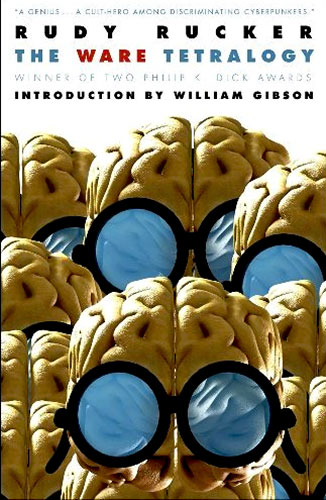
By the way, if you hunger for an honest, printed, paper omnibus edition of SOFTWARE, WETWARE, FREEWARE, REALWARE, this will be out from Prime Books at the start of April! You can pre-order it now from Barnes and Noble or Amazon.

And there’s no need to look for a pirated version of POSTSINGULAR as I myself posted a free Creative Commons version of it online a couple of years ago. Cory Doctorow talked me into it—he claimed it would help my sales, which didn’t really seem to happen for me, although a lot of people did download the book, and I was happy to see it getting out there. It’s not like I’ve ever made any real money from my commercial ebooks so far…

One topic I’d like to throw out there for input…suppose I wanted to sell some of my older books as ebooks myself—my older books don’t necessarily have ebook clauses in their contracts. Is anyone doing this? What are some good routes? Is it worth the hassle? Can you get listed on the big ebook distribution sites?

At this point, one thing to keep in mind is that the ebook market is quite small, and there is very little money to be made by ebook versions of anythign other than best-sellers. I guess the topic interests me because it’s an aspect of my typical-for-an-author desire to stay in “print”.

It looks to me as if none of my non-fiction books are available as ebooks. And among the novels, I don’t see ebooks of the Tor titles: MATHEMATICIANS IN LOVE, FREK AND THE ELIXIR, AS ABOVE SO BELOW: BRUEGEL, or SAUCER WISDOM. Among the books with other publishers, I don’t see ebooks of HOLLOW EARTH, ALL THE VISIONS, MASTER OF SPACE AND TIME, or WHITE LIGHT. I might dig out the contracts for these books and possibly produce ebooks of those whose electronic rights are unencumbered.

But at some point worrying about this can use up too much time—it starts to feel like trying to build my own gravesite monument in the waning years of my life, years that might be better spent walking in the woods…

Another topic that I’ll only touch on briefly is—royalties. Some of the more grasping and retrograde companies are trying to hold the royalty line at the paperback rate, something like 7 and a half percent of the ebook’s retail price. Others are offering 10 or even 20 percent of retail price. Or, again, I’ve seen the figures of 20 or 50 percent of the net, which is the amount the publisher actually takes in for the ebook. Most writers feel that, since there is essentially zero cost for producing an additional ebook once the file is prepared, the royalty should definitely be higher than what we get for paper books, which do cost money to produce. Nobody yet knows where it will settle down.

Making a High-Quality Picture Book

Monday, February 8th, 2010

I’ve been busy making some photo-album books and a third edition of my art book, now with 62 full-size paintings for $29 from Lulu: Better Worlds. (I got my first copy of the new edition on February 12, and it looks great.)

As regular readers of Rudy’s Blog will know, I have an interest in creating art books and photobooks, whether for family gifts or for products that I can sell online as print-on-demand books. I posted about these and related topics before, on March 27, 2008, under the heading “POD and Ebooks.” Some of the links in the post and its comments are still useful.

In December, 2008, I designed the first edition of Better Worlds , with only 47 pictures. (As mentioned above, the new version has 62.) Now that I’m going through the process again, I thought it would be worthwhile to write up the steps so I can find them again. And maybe some of my readers might find this useful as well.

Geekage Alert!

I’m going to describe a procedure is for a Windows machine with Office 2007, Adobe Acrobat Pro, and two gigabytes of RAM. The basic process is to create a document that looks like your photobook, save it as a high-resolution Adobe PDF, and upload this PDF to a print-on-demand site. (In principle it seems like you could do essentially the same thing on a Mac, but my expertise is in Windows.)

Why don’t I just use Lulu’s online photobook design software or Blurb’s downloadable design software BookSmart? Well—I’m a computer hacker and I like to tweak. And I don’t like either the Lulu or the Blurb wares very well, as they default to cropping my pictures—and generally I have already cropped my pictures to be the way I want. (I know I can cancel the cropping, but that takes a lot of clicks.)

I also find the Lulu and Blurb software to be somewhat kludgy and hard to use—the response is sluggish and you have to repeat a lot of steps, and when you make a big book, these wares are highly prone to running out of RAM and freezing up. Also, I worry that these wares may in fact downsample my images to a lower resolution than I’d like.

And my guess is that the Mac iPhoto bookware also tends have these same two issues, that is, the issues of cropping your images and of downsampling images to overly low resolutions. Also the iPhoto books are much more expensive.

So I’m learning to do it myself with Word and Acrobat Pro. I actually own a copy of Adobe In Design, which is especially made for designing books, but so far I haven’t gotten it together to learn how to use it. It seems like I can what I want done pretty easily with Word.

The plan is to create an Adobe Acrobat PDF file of my book on my desktop machine and to upload this file to the Lulu or to the Blurb self-publishing sites.

Lulu has a tutorial about how to make a PDF.

And Blurb describes a similar process, although not quite as clearly. I’ll make a few remarks about how to work the Lulu and Blurb processes below

Create Your Document File

Put your JPG files into a directory. Create a Word document in this file. The shape of your pages needs to match the shape of a book that an online print-on-demand publisher uses. I have been using Lulu, where I can pick a book shape and download a template in the form of a .DOC file. You can open this template as if it were a document, and save it as the document for your book. The pages are shaped the right way for the book.

Blurb only supplies Adobe In Design templates for their book shapes—which mostly don’t happen to be the same shapes as Lulu’s. I’m not currently running In Design. But there’s a fairly easy workaround for using Word. I just load a Lulu template for a document that is approximately the same shape (for whatever reason the two companies have non-identical lists of book sizes), and then I use the Page Layout|Page Setup dialog in Word to set the page size to match the targeted Blurb book page size. I can double check these sizes on a Blurb page that lists the desired page sizes and margins, but if I’m just using the margin settings from a comparable Lulu template, that’s close enough.

Insert Your Pictures

So let’s suppose that one way or another you’ve opened a Word file with the page layout matching a targeted print book size. Use Insert|Picture dialog. It’s easiest just to insert all your pictures at once. Navigate to the directory with your pictures and make sure they’re in an order you like. If you right click in the file list you get a context menu where you can choose Arrange Icons By to get a choice or automatic orderings. Do that.

Then select all of the pictures for your album at once. Use Insert|Link to File to put them all into the document . This is important. You need to use the Insert|Link to File option rather than the plain Insert option because otherwise your document will get too large for Word to handle it. If you use Insert|Link to File option, the doc is small, and the pictures “live” outside it.

Arrange Your Pictures

Go to Word|Word Options|Display|Always show these formatting marks on the screen and turn on the check mark by Paragraph marks. Now make sure there is a paragraph break ¶ after each photo. Until you do this, you will have difficulty getting more than one photo per page.

Now select the whole file with the Ctrl+A key combination, and use Home|Paragraph|Centered if you want to center all the images. I recently made a book in a standard kind of paper shape, that is 8 inches across and 11 inches high, and I mostly put two pictures on a page, one above the other, so it was natural to center them.

You can resize the images by dragging their corners. Note—and this is the good news—that their aspect ratios are preserved. They’re not cropped. And they’ll flow together, squeezing onto the same pages if there’s room. If they are small, you can have two on one line. Insert spaces to put room between them. Or have one above the other, usually with an extra paragraph break in between for spacing.

Set-up for Printing to Adobe PDF

Now to save as a PDF. If you have downloaded the 2007 Microsoft Office Save As PDF Add-in, you have the option File|Save As PDF. Generally you don’t want to use this, as it will save your images at a very low resolution, something on the order of 72 pixels per inch, which isn’t suitable for printing.

Instead you have to use the Word Print dialog and set the printer to be Adobe PDF. In order for this Print option to be there, I believe that you need to have Adobe Acrobat Pro installed on your machine. Adobe Acrobat Pro is, I’m sorry to tell you, a product that you need to buy, it’s not free like the Adobe Reader.

If you’re still with me, you now have to change the Properties of the Adobe PDF print.

The easiest way to to this is to get a Adobe PDF “joboptions” file from Lulu or from Blurb. Here is a Lulu link that shows you a text page that you save as a text file called Lulu.joboptions. And here is a link to a Blurb page that has a button for downloading a zipped version of their Blurb PDF X-3 Export Preset v1-1.joboptions file.

How do you use a joboptions file? Basically it’s just a bunch of dialog settings. You can click on a joboptoins file to see what’s inside it. To use one, you place it in your local directory that holds application data for Adobe. On my machine this is:

C:\Documents and Settings\user\Application Data\Adobe\Adobe PDF\Settings

Okay…now to apply the settings to your print job.

On the Word Print menu, you select Adobe PDF as your printer, and then go into Properties|Adobe PDF Settings . If you’re using a joboptions file, go to the Default Settings list box and scroll to find a joboptions name like Lulu or like Blurb PDF X-3 Export Preset v1-1.

Ack! Too much geekage. Quick…need art…

The sixty or so pictures in the new edition of BETTER WORLDS!

Now…back to the Adobe PDF Properties Adobe PDF Setting dialog…sigh.

If you don’t use a joboptions file, you can edit the settings yourself, using the Edit dialog. Once you have edited the settings, you can Save them under a new name that you choose. So really you would only need to do these tweaks once. But, again, it’s smarter just to get hold of a joboptions file from your intended publisher.

There are a few specific things that the joboptions settings do…and these are things you’d do yourself if you wanted to.

(1) You want to make sure you’re using a high pixel count, but not so high that your PDF gets too unwieldy. Select the Edit|Images option, you can make sure that your Color Images are printed to the PDF at 300 pixels per inch. Note that you set two numbers, the targeted size, and the size above which the image is downsampled to be the target size. You can set both of these to 300.

(2) Most printers require that you embed your fonts. So—if you are using fonts—go to Properties|Adobe PDF Settings|Edit|Fonts and make sure that Embed All Fonts is checked.

(3) Color is an issue, and there are numerous ways to tweak the settings. I won’t go into this here, as I’m kind of ignorant on the topic, which is why I like using the joboptions files. The Blurb site explains a little about color for printing.

Print to Adobe PDF

Before invoking the Print, do check one thing. Make sure that the PDF file is going to be “printed” at the same page size as the page sizes of your intended book. If you used a Lulu template to build your document, this will happen automatically, but if you manually set the page size in your document, you’ll need to set the Adobe PDF Page Size.

This setting is on the Print dialog in the Adobe PDF Properties dialog page in the Adobe PDF Page Size list-box. If you don’t see the page size you want, use the Add… button to create a custom page size and give it a name.

Okay, now close every application except Word and start to print.

The printing-to-Adobe-PDF process takes a long time, like maybe an hour, and uses a lot of RAM. Close all your other applications before you start it. And don’t use your computer for the time that the printing takes. First you see a dialog saying pages are being processed, and then for quite a while nothing seems to be happening but Adobe Distiller is invisibly at work. When it’s done an Acrobat window will pop up showing your file. Leave the computer alone until the printing is really done or you’ll lock it up and probably have to start over!

Depending on whether you went for 200, 300, or 400 pixels per inch, and on how many pictures you have, the resulting PDF will be a hundred megabytes or maybe a gigabyte, or more. At 300 dpi, an eighty page book might be about two hundred megabytes.

Upload your PDF

To upload a PDF this big you have to use their ftp. Both Lulu and Blurb have pages explainging how to do this. You can download the free ftp client software Filezilla for doing this. Uploading your PDF can take an hour or several hours, depending on the file size. While this is happening, you can’t effectively do email or web surfing very well, as your internet link is full of bytes. It’s better to leave the machine and go do something else until the process done.

In Lulu the file ends up in a location called My Files, and then you can add it to a project—Lulu has fairly good Help online. Or you click around and eventually figure it out. I think on Blurb the process is similarly transparent.

One final caution here. Often you’ll decide that you want to upload a revised version of your image-file PDF. Always give the new file a new name, like by putting “ver2” at the end. If you upload a file with the same name twice, the publisher’s database is likely to get confused and you won’t be able to use the file.

Groundhog Day

Monday, February 1st, 2010

Groundhog Day is February the second! I remember living in towns with rough weather—like Geneseo, New York, up near Rochester. And then there’d be a article in the paper every year about the so-called groundhog Punxsutawney Phil in Punxsutawney, Pennsylvania. (What a GROOVY town name!) It seemed like Phil would always predict a heartbreaking six more weeks of Winter.

I formed a bitter theory that this so-called groundhog was in fact a fact a robot on rails. I’d discuss this endlessly with my three children, summing up my theory in the slogan:

Zzzt—*shine*—zzzt!

The first “Zzzt” is the sound of the fake mechanical Pennsylvania groundhog rolling out on rails. The “*shine*” is the illumination by a powerful TV camera floodlight producing a shadow. And then comes the predetermined and automatic second “Zzzt,” which represents the rolling back of the mechanical groundhog and the extinguishing of all human hope.

What is the motive behind this cruel hoax? My theory is that it’s designed to crush the hopes of the public at large. Why? Because a despairing populace stays inside and watches TV, only going outside to visit the shopping mall or a big-box retailer. Sufficiently beaten down, we become ideal consumers, robotic drones in the capitalist hive.

An even more paranoid theory of mine in those times was that external reality is (as quantum mechanics tells us) nothing more than a consensual group hallucination and that therefore, if the media can convince us that the weather will be bad—then the force of our collective convictions will guarantee that the weather really is bad.

By the way, I worked this last theory (that a conspiracy to forecast bad weather is creating the bad weather) as an aside into my short story, “Schrödinger’s Cat,” which appeared in Analog in March, 1981. Just for the fun of it, I’m putting a PDF version of “Schrödinger’s Cat” online for you to read. And here’s the relevant excerpt from the story:

I had a nervous breakdown during my fourth year at Wankato. It had to do with the television weather reports. Quantum mechanics implies that until someone makes an observation, the weather is indeterminate, in a mixed state. There is, in principle, no reason why it should not be sunny every day. Indeed, it is logically possible to argue that it rains only because people believe it to be raining.

Fact: in Wankato, Minnesota, there is precipitation 227 days of the year.

Before too long I thought I had determined the reason for this. All of the citizens of Wankato … even the faculty members … watch television weather reports every evening. These reports almost always predict rain or snow. It seemed obvious to me, in my isolation, that if the weather reports could be stopped, then it would not rain so often.

I tried, unsuccessfully, to gather signatures for a petition. I went to the TV station and complained. Finally, I forced my way into the studio one evening and interrupted the weather report to state my case.

“Tomorrow it will be sunny!” I cried. “If only you will believe!”

The next day it was sunny. But I was out of a job, and in a mental institution. It was clear that I needed a rest. It had been folly to shift my fellows over so abruptly from one belief system to another.

Changing perspective a bit—the movie Groundhog Day is, I would say, one of the very best science-fiction movies ever made, and has a very clever and philosophically profound treatment of time. The author of the story and co-author of the script is Danny Rubin, who maintains an interesting Blogus Groundhogus about his career and about his sacred text. I notice that the second version of Danny’s script (as revised by the film’s director, Harold Ramis), is online.

In an email today, Danny wrote me, “The first draft of the screenplay — which everybody seems interested in — is going to be published soon so you’ll get to see how it developed.” And, late-breaking news flash, Danny is giving me an unpublished SF story of his, “The Palmetto Man” to run in the Spring-Summer, 2010 Issue #9 of my webzine, Flurb! Yeah, baby!


[Image copyright (c) Andrew Wyeth. See the link below for purchasing prints.]

And don’t forget Andrew Wyeth’s classic painting, “Groundhog Day.” Sylvia and I had a print of this on our wall for years, it was like having an extra window. And then it fell out the window and was gone.

And, changing the subject once more, I just finished my own groundhog-day-time-period painting today, the first painting I’ve done in awhile. It’s called Amenhotep’s Ghost, and it has to do with a creature who’s making some dramatic and disturbing appearances in the closing chapters of my novel-in-progress, Jim and the Flims. He’s holding the flail, hook and ankh, symbolic of a pharoah’s power.


[Image copyright (c) Isabel Rucker 2009.]

I got some of those hieroglyphics from my daughter Isabel, who used them in this frame of her masterful graphic novel Unfurling to depict a street-person speaking “Tweakenese.”

What are Amenhotep and the tweaker saying?

“It can be Spring starting tomorrow, if only we’ll open our minds! And don’t let them fool you with the Zzzt—*shine*—zzzt! of Punxsutawney Phil! And Danny Rubin rocks!”


Rudy's Blog is powered by WordPress